Showing posts with label SOA. Show all posts

Thursday, February 16, 2017

IBM Datapower Developerworks Articles


IBM Datapower DeveloperWorks Articles
4.    Integrating the WebSphere DataPower SOA Appliance XI50 with the WebSphere Application Server V7 default JMS messaging provider
6.    Using OAuth on IBM WebSphere DataPower Appliances
7.     SOA governance using WebSphere DataPower and WebSphere Service Registry and Repository
8.    Leverage DataPower SOA Appliances to extend InfoSphere Master Data Management Server security capabilities
9.    Using WebSphere DataPower and WebSphere MQ File Transfer Edition to manage file transfers
10.  Configuring a WebSphere DataPower Kerberos-secured backend server
11.   Overriding the WebSphere DataPower WSDL optimization conversion
13.  Using the WebSphere DataPower Option for Application Optimization to demonstrate self-balancing across multiple DataPower appliances and intelligent load distribution to backend servers
14.  Integrating WebSphere DataPower SOA Appliances with WebSphere MQ
15.  Performance advantages of using WebSphere DataPower XC10 Appliance as a side cache for a Java application
16.  Integrating DataPower with WebSphere Message Broker using the Broker Explorer
17.  Integrating WebSphere DataPower XML Security Gateway XS40 with WebSphere Message Broker
20. Integrating Web applications with the DataPower Web application firewall service
21.  Managing WebSphere DataPower SOA Appliance configurations for high availability, consistency, and control, Part 1
22. Managing WebSphere DataPower Device configurations for high availability, consistency, and control, Part 2: Application promotion strategies
24. Using DataPower SOA Appliances to query WebSphere Service Registry and Repository

Monday, December 19, 2016

Callable message flows in IBM Integration Bus on Cloud

The introduction of callable flows makes IBM Integration Bus (IIB) a truly hybrid integration solution, allowing you to split integration tasks easily between on-premises and cloud IIB installations. You can call on-premises flows securely from the cloud; you can call cloud-based flows securely from IIB on premises. Callable flows facilitate reuse and the dynamic routing of workload.
CallableFlows
these two calling and callable flows can be deployed on two different instances, which are not required to run in the same EG/Integration server
To find out more about callable flows, see Callable message flows in the IBM Knowledge Center.

Wednesday, November 16, 2016

Websphere MQ Series Administration 7.5


Module 1 – WebSphere Message Queue 7.5 Introduction
• What is Message Queue
• What is a Message and Queue
• Types of Messages
• Message Access
• Synchronous Vs Asynchronous
• Heterogeneous Systems
• Character Sets
• Messaging Models
• Transactions
• Scalability
• High Availability
Module 2 – Installation 
• Installation Overview
• Creating Users and Groups
• Product Directory Structure
• Disk Space requirements
• Installing Server
• Supports Pacs
• Uninstalling Server
Module 3 – Queue Manager
• Creating Queue Manager
• Starting Queue Manager
• Stopping Queue Manager
• Deleting Queue Manager
• Displaying Queue Manager Status
• Queue Manager Properties
• Automatic Startup
• Communicating between Queue Manager
Module 4 – Queue
• Introduction
• Local Queue
• Transmission Queue
• Remote Queue
• Alias Queue
• Model Queue
• Queue Default Options
Module 5- Channels, Listeners & Bindings
• Introduction
• Listeners
• Types of Channels
• Channel Pairing
• Channel Triggering
Module 6– Clustering 
• Introduction
• Advantages of Clustering
• Cluster Repository
• Clustering Best Practices
• Cluster Work Load Balancing
• Sending Message to a Cluster Queue
• Remove Cluster Queue Manager from Cluster
• High Availability Cluster
Module 7 – Publish Subscribe 
• Topic
• Subscription Types
• Publication
• Publish Subscribe features
• Local Publish Subscribe
• Distributed Publish Subscribe
Module 8 – Security 
• Security Objectives
• Achieving Security Objectives thru WMQ
• General Security Principals
• Channel Security with Channel Exits
• Channel Security with SSL
• Channel Authority Records
Module 9 – Client
• Why MQ Client
• MQ Client Configurations
• MQ Channel Definition Table
Module 10 – Logging, Troubleshooting, Backup and restore 
• Introduction
• Types of Logging
• Logging Configuration
• Log sizing
• Log Archiving
• Troubleshooting Steps
• Backing up MQ Configuration and Data
• Checkpoint Recovery

TOC - IBM Websphere Message broker, Integration bus

IBM - Web Sphere Message Broker Development


Overview and Architecture
Need for Integration (EAI)
Types of integration
SOA Architecture Overview
Overview and Architecture of Message Broker
Components of Message Broker
Message Queue (MQ ) overview
Overview of MQ Series
Working with MQ Explorer
Working with Commands
Working with RFHUTIL Tool
Clustering
Publish and Subscribe
How tuse Message broker toolkit
Explain how the toolkit is used to:
• Configure the environment
• Import a simple message flow
• Deploy (publish) ta broker
• Manage a broker archive (.bar) file
• Test the deployed message flow
ESQL Programming
Read the contents of the input message
Modify message content with data from databases
Construct new output messages created from all, part, or none of the input message
Handling XMLNSC and MRM messages
Data Types, Variables, Field references
Functions, Procedures & Modules
Configuring ESQL within Nodes
Logical Tree Structure
Message tree
Environment tree
Local Environment tree
Exception ListDebug and trace
Use the debugger and set breakpoints
Enable user trace and retrieve trace data
Use and configure a trace node within a message flow
Logs
Event log
Error log (Event Viewer)
Implementation using basic nodes
MQInput
MQOutput
MQReply
FileInput
FileOutput
Input terminal
Output terminal
ResetContentDescriptor
Email
Timer
HTTP Input & Reply
Transformation using below nodes
Compute
Mapping
XSLT
Java
Routing in WMB
Achieve routing of messages tdesired destination using following nodes.
Filter
FlowOrder
Label
RouteToLabel
Aggregation
Collector
Message Modeling
Different types of message sets
How tcreate Message definition files
Using xml Schema file
Using wsdl file
Using Cobol copy book
Webservices Implimentation
What is Webservice ?
Types of webservice calls
Developing Web servicesWSDL ( Web Service Description Language)
SOAP ( Simple Object Access Protocol)
Publishing message flow as Webservice
What are nodes available in WMB timplement Webservice ?
SOAPInput
SOAPReply
SOAPRequest
SOAPEnvelope
SOAPExtract
SOAPAsyncRequest
SOAPAsyncResponse
Exception Handling
There are twtypes Exceptions
System
error
Application
error
How tuse following nodes thandle exceptions
TryCatch
Throw
How tparse Exception List
How tcapture Exceptions using Trace node
Database Operations
Call Database using Compute node
Call Database using Database node
Overview of Tools for Testing
SOAP UI
RFHUTIL
Mini Project - Students have tcomplete this
Real Time Project – Case study
Interview and Resume Preparation

Tuesday, November 8, 2016

How to increase JVM IBM integration bus

mqsireportproperties TESTNODE -e Java_POC -o ComIbmJVMManager -r


mqsichangeproperties TESTNODE -e Java_POC -o ComIbmJVMManager -n jvmMaxHeapSize -v 1073741824


mqsireportproperties TESTNODE -b agent -o ComIbmJVMManager -r


mqsichangeproperties TESTNODE -b agent -n jvmMaxHeapSize -o ComIbmJVMManager -v 1073741824

Tuesday, November 1, 2016

 IIB on the cloud

WMQ Concepts

Please click the link

EAI patterns

Please click on the link

http://www.enterpriseintegrationpatterns.com/patterns/messaging/

EAI – enterprise application integration

Please click the link

EAI, ESB, SOA

INTRODUCTION This paper aims to bring clarity to terms EAI, ESB, SOA and provide a clear distinction. Also this paper would discuss architecture options available for enterprise integration and what these options are most suitable for. Finally this paper would address the discussions we have seen in various forums about whether EAI is going to be replaced by SOA or ESB.

SOA-  Service oriented architecture is approach to have software resources in an enterprise available and discoverable on network as well defined services. Each service would achieve a predefined business objective and perform discrete units of work. The services are independent and do not depend on the context or state of the other services. They work within distributed systems architecture. Earlier SOA used COM or ORB based on CORBA specifications and recent SOA stress on web services using standard description (WSDL), discovery (UDDI) and messaging (SOAP). Service oriented architecture may or may not use web services but yes web services provide a simple way towards service oriented architecture albeit with the age old security and reliability limitations.

EAI -Enterprise application integration is a business need to make diverse applications in an enterprise including partner systems to communicate to each other to achieve a business objective in a seamless reliable fashion irrespective of platform and geographical location of these applications. It is a business need and business never dies it only evolves. I have seen people saying that EAI is a thing of past now SOA is here, it is just like saying “transportation is a thing of past now road is here”. EAI comprises of message acceptance, transformation, translation, routing, message delivery and business process management. Usually messages transportation is asynchronous but for a business need it can be synchronous as well. There are two basic architectures to achieve this, bus and hub/spoke architecture. Both of these can be used to develop services and then it also becomes service orientated architecture.

ESB- Enterprise service bus is an infrastructure to facilitate SOA. It gives API which can be used to develop services and makes services interact with each other reliably. Technically ESB is a messaging backbone which does protocol conversion, message format transformation, routing, accept and deliver messages from various services and application which are linked to ESB. Current EAI landscape is seeing many vendors who offer enterprise service bus and claim it to be a brand new concept. This brings a question on what exactly is the difference between ESB and the bus based implementations which have been there in market for quite a long time now. Actually there is not much difference between ESB and proprietary buses except for a few subtle ones. Main difference between ESB and proprietary bus implementation is of cost which is significantly low for ESB. Reason for this cost difference is two fold, first proprietary bus offers lot of built in functionalities as a suit of product which need to be developed for ESB implementations based on business requirement, second most proprietary buses use some proprietary formats to enhance the performance and that increases the cost. ESB on the other hand is usually standard based, so it is a tradeoff between performance and cost between proprietary bus and ESB. Main advantage of ESB is that it costs much less then hub/spoke or bus based product suits and that it is standard based.

Please visit the link for more information

Thursday, October 27, 2016

Websphere IIB or WMB Error handling

Error handling
  1. Create a backup queue and set a backout threshold on the input queue. In many cases, a backup queue can help you know where to look for a failed message.
  2. Use Try, Catch block for the entire Flow.
  3. Use custom exception handling so that even the smallest bug can be analyzed and can be effectively removed.
  4. Logging mechanism :- Logging can be the most effective part as it can in turn become a performance hit. So effective logging mechanism should be present in the flow.

Backout Queue :-
While the MQ administrator sets the backout parameters, they are really used by well-behaved WebSphere MQ applications to remove potential “poisoned” messages from the queue, or messages that cannot be processed due to other issues. This is important for both shared queues and private queues, though the symptoms may differ. The parameters are:
BOQNAME(‘PRT.REQUEST.BOQ’)
Name of queue to which applications should write messages that have been backed out.
BOTHRESH (3)
Number of processing attempts for each message.
HARDENBO
Harden the backout counter to disk when syncpoint is done.
If a message on a private queue cannot be processed and a rollback is issued, that message goes back to the top of the queue. The next MQGET for that queue will pick the problem message up and try to process it again. If that attempt fails and the transaction is rolled back, the message once again goes to the top of the queue. WebSphere MQ maintains a backout count that can notify an application when it is looping on the same message. If the application ignores the backout counter, the first indication of a poison message is that a queue depth begins rising and the getting processes continues to run.
Limitations:-
  • Use one backout queue per application, not per queue. One backout queue can be used for multiple request queues.
  • Do not use the queue-manager-defined dead letter queue as the backout queue, because the contents of the backout queue are usually driven by the application. The dead letter queue should be the backout queue of last resort.
 Exception Handling using Try Catch Block
A TryCatch node does not process a message in any way, it represents only a decision point in a message flow. When the TryCatch node receives a message, it propagates it to the Try terminal. The broker passes control to the sequence of nodes that are connected to that terminal (the try flow).
If an exception is thrown in the try flow, the broker returns control to the TryCatch node. The node writes the current contents of the exception list tree to the local error log, then writes the information for the current exception to the exception list tree, overwriting the information that is stored there.
The node propagates the message to the sequence of nodes that are connected to the Catch terminal (the catch flow). The content of the message tree that is propagated is identical to the content that was propagated to the Try terminal, which is the content of the tree when the TryCatch node first received it. The node enhances the message tree with the new exception information that it wrote to the exception list tree. Any modifications or additions that the nodes in try flow made to the message tree are not present in the message tree that is propagated to the catch flow.
Limitations:-
  • Useful in small flows with less complexity and scenarios.
  • Too many Try Catch node in large flows creates complexity.
  • Too many Try Catch node in large flows leads to performance hit.
Custom Exception handling
Exception handling for big projects or Applications which consists of n number of flows can be customised.
The broker provides basic error handling for all message flows. If basic processing is not sufficient, and you want to take specific action in response to certain error conditions and situations, you can enhance your message flows to provide your own error handling.
For example, we might design a message flow that expects certain errors that you want to process in a particular way. Or perhaps our flow updates a database, and must roll back those updates if other processing does not complete successfully.
Because you can decide to handle different errors in different ways, there are no fixed procedures to describe. This section provides information about the principles of error handling, and the options that are available, and you must decide what combination of choices that you need in each situation based on the details that are provided in this section.
In these cases it is advisable to create a framework which can be made generic and can be reused throughout the flows.
For example check the poison handler in the pic:-
Logging Mechanism:-

Logging can be the most effective way to analyze data for each scenario. So effective logging mechanism should be present in the flow not only for the happy scenario but also for analyzing the smallest errors or loopholes in the flows.
One of the ways is to integrate in the custom reusable components so that each input message can be logged irrespective of success or failure.
Also this can be evolved with the particular node names, timestamp and all other information as per requirement and severity.
Several ways of logging in IIB/WMB:-
  • Database Logging
  • Write to a file using IIB nodes
  • Java Plugin
Limitations:-
  1. Database Logging can be in turn become a performance hit for the application. So decision to be taken depending upon the size and frequency of data. In this case database archiving can be implemented to overcome this sort of situation.
  2. Logging through Java log4net is an efficient way to maintain logging as it minimizes database hit but the only con it has is the files keep on piling up.

Job Scheduling in IIB9 using Timeout nodes


Requirement: Pick up files at scheduled time and send out an email at the end.
Implementation using: IBM Integration bus(IIB9)
Requirement analysis:
  1. IIB process should transfer the files at 11:00 PM everyday to a destination directory.
  2. A mail needs to be sent to a user with all the file names which are picked up on that particular day.
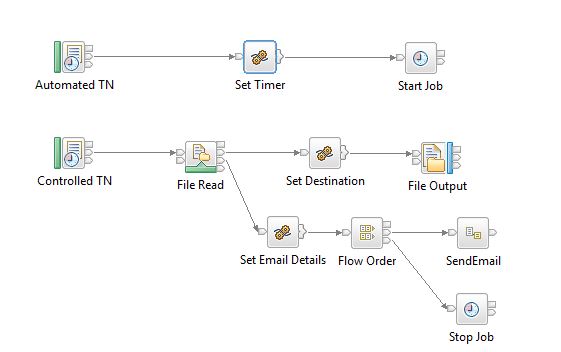
Below image shows complete message flow.

Complete Message Flow

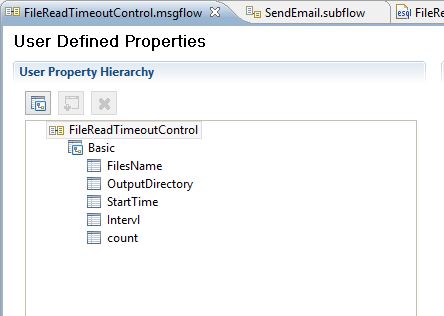
Configure the properties as shown in below images.

User Defined Properties

We need to configure these properties so that values can be changed at run-time. Once created, we need to declare them in the compute node to use in the code as shown below.
DECLARE OutputDirectory EXTERNAL CHARACTER ”;
DECLARE StartTime EXTERNAL CHARACTER ”;
DECLARE Intervl EXTERNAL CHARACTER ”;
DECLARE count EXTERNAL CHARACTER ”;
DECLARE FilesName SHARED CHARACTER ”;
Values for these properties will be set in baroverride file like,
au.com.LearnIIB.FileOperations.FileReadTimeoutControl#InputDirectory=C:\Users\nusa\IBM\InputDir
au.com.LearnIIB.FileOperations.FileReadTimeoutControl#OutputDirectory=C:\Users\nusa\IBM\OutputDir
au.com.LearnIIB.FileOperations.FileReadTimeoutControl#StartTime=23:00:00 —-Will be triggered at 11:00 PM daily.—-
au.com.LearnIIB.FileOperations.FileReadTimeoutControl#Intervl=30 —-After StartTime file gets picked up at every 30 seconds till flow moves to No Match in FileRead node—-
au.com.LearnIIB.FileOperations.FileReadTimeoutControl#count=-1
The first node is used to trigger the controlled node and to control the number of instances and intervals. Properties for which are shown below.

Automated Timeout Notification Properties

Here as we want to trigger the flow once in a day, we give time out interval value as 24*60*60 seconds. Once this node gets triggered, we set properties for the controlled node as shown below in the next compute node.
Set OutputLocalEnvironment.TimeoutRequest.Action =’SET’;
Set OutputLocalEnvironment.TimeoutRequest.Identifier =’ControlledTN’;
Set OutputLocalEnvironment.TimeoutRequest.StartDate = CURRENT_DATE;
Set OutputLocalEnvironment.TimeoutRequest.StartTime =CAST(StartTime AS TIME);
Set OutputLocalEnvironment.TimeoutRequest.Interval = CAST(Intervl AS INTEGER);
Set OutputLocalEnvironment.TimeoutRequest.Count=CAST(count as INTEGER);
Set OutputLocalEnvironment.TimeoutRequest.IgnoreMissed=FALSE;
Once values are set for the controlled node, we use timeout control node which will have unique identifier same as controlled timeout notification node as shown below.

Start Job Properties

Below image shows the properties we need to set for the Timeout notification node which we are trying to control and schedule here.

Controlled Timeout Notification Properties

Now if everything is right, this node gets triggered at the set time and flow picks up the files and moves to next compute node where we set output file properties.
SET OutputLocalEnvironment.Destination.File.Directory = OutputDirectory;
SET FilesName = InputLocalEnvironment.File.Read.Name;
SET OutputLocalEnvironment.Destination.File.Name = InputLocalEnvironment.File.Read.Name;
PROPAGATE TO TERMINAL ‘out’ DELETE NONE;
Once all the files are picked up, flow moves to No Match node and then to set email properties. Here we need to cancel the timeout notification so that again an instance won’t get created.
SET OutputLocalEnvironment.Variables.sendEmails.emailDetails.mailSuccess.bodyContentType = ‘text/html’;
SET OutputLocalEnvironment.Variables.sendEmails.emailDetails.mailSuccess.to = ‘ToAddress’;
SET OutputLocalEnvironment.Variables.sendEmails.emailDetails.mailSuccess.cc = ‘CCAddress’;
SET OutputLocalEnvironment.Variables.sendEmails.emailDetails.mailSuccess.from = ‘FromAddress’;
SET OutputLocalEnvironment.Variables.sendEmails.emailDetails.mailSuccess.subject = ‘Files transfer was successfull’;
SET OutputLocalEnvironment.Variables.sendEmails.emailDetails.mailSuccess.body = ‘Following files are being transferred successfully<br/>’ || FilesName;
Set OutputLocalEnvironment.TimeoutRequest.Action =’CANCEL’;
Set OutputLocalEnvironment.TimeoutRequest.Identifier =’ControlledTN’;
Now we use Timeout control node which will have unique identifier same as of controlled timeout notification node to cancel the scheduled job.

Stop Job Properties

Distributed Computing: A Guide to Comparing Data Between Hive Tables Using Spark

In big data, efficient data comparison is essential for ensuring data integrity and validating data migrations. Apache Spark, with its in-me...