Showing posts with label IIB. Show all posts

Thursday, September 21, 2017

Adding Certificates to trustore

1)Open ikeyman utility : C:\Program Files\IBM\IIB\10.0.0.9\common\jdk\jre\bin

2)Clink Open, then Browse:

3)Navigate to Truststore, then Open: (trustore.jks)

4)click OK

5) Enter pwd then click Ok

6)Select signer certificate from dropdown.

7) Lcisk Add then browse

8) Select Cert to add then click open.

9) Click Ok.

10) Enter a label then OK

11) done, new cert has been added.

Reference: https://www.ibm.com/support/knowledgecenter/en/SSKM8N_8.0.0/com.ibm.etools.mft.doc/ap34020_.htm

Thursday, February 16, 2017

IBM Integration Bus Tech Reference

Webcast replay: WebSphere Message Broker - Security Administration


Webcast replay: Integrating WebSphere Message Broker V7 with SAP


Webcast: Migrating to IBM Integration Bus V10


Index: IBM Integration Bus and WebSphere Message Broker trace directions


Webcast replay: Debugging top 5 memory problems in IBM Integration Bus (IIB)


Open Mic Replay: Security in WebSphere Message Broker


Webcast replay: Implementing SSL with HTTP nodes in WebSphere Message Broker


Webcast replay: WebSphere Message Broker - Security in SOAP nodes


Webcast Replay: IBM Integration Bus - What's new


Webcast replay: Common Problems While Configuring SSL in v8 Message Broker


Webcast replay: How do you use .Net with the Broker


Webcast replay: Using TCP/IP Based Applications with WebSphere Message Broker


Webcast replay: Events-Based Messaging Monitoring in WebSphere Message Broker V7


Webcast replay: Using WebSphere Message Broker Configurable Services


Webcast replay: Packaging and Deploying Java Based Solutions to WebSphere Message Broker


Webcast Replay: Tools and techniques for performance testing IBM Integration Bus (IIB) solutions


This procedure is typically run to track down problems in IBM Integration Bus (IIB) or Websphere Message Broker (WMB) with database connectivity such as user access and dropped database connections. Gathering this information before calling IBM Support will help familiarize you with the troubleshooting process and save you time.


The following is a list of answers to frequently asked questions (FAQ) about Migration in IBM Integration Bus (IIB) and WebSphere Message Broker (WMB) for new and experienced users.


The following is a list of answers to frequently asked questions (FAQ) about Database in IBM Integration Bus (IIB) and WebSphere Message Broker (WMB) for new and experienced users.


Performance is degraded when IBM Integration Bus (IIB) or WebSphere Message Broker (WMB) calls stored procedures.


Use this procedure to capture a user or service level trace of an IBM Integration Bus (IIB) message flow at an Integration Server level or a WebSphere Message Broker (WMB) message flow at an execution group level. 

Gathering this information before calling IBM Support will help familiarize you with the troubleshooting process and save you time.


This Index is a compilation of links to documents that provide instructions for gathering various trace data on IBM Integration Bus (IIB) and WebSphere Message Broker (WMB) and related products.
Content
Trace can gather additional details required for problem solving. Follow the directions provided in these documents to gather trace details.


Use this procedure to capture a service level trace of the "Admin agent" (bipbroker process) in Websphere Message Broker or IBM Integration Bus. 

Gathering this information before calling IBM Support will help familiarize you with the troubleshooting process and save you time.


Use the procedures below to take a startup trace of a broker or execution group in WebSphere Message Broker (WMB). 

IBM Integration Bus (IIB) V9 replaces Execution Group with Integration Server. Similar instructions are provided below for collecting Integration Server startup trace. 

Gathering this information before calling IBM Support will help familiarize you with the troubleshooting process and save you time.


Use this procedure to capture a IBM Integration Bus (IIB) or WebSphere Message Broker (WMB) trace of a failing deploy to a broker. 

Gathering this information before calling IBM support will help familiarize you with the troubleshooting process and save you time.

Integration Server or Execution Group memory growing
Your IBM Integration Bus (IIB) Integration Servers or WebSphere Message Broker (WMB) Execution Groups appear to be growing in memory indefinitely.

Increasing the maximum JVM heap size of the WebSphere Message Broker HTTP listener

The broker-wide listener process (biphttplistener) handles both inbound requests and outbound replies for the HTTPInput and HTTPReply nodes across an entire broker. By default, this listener is started with a maximum JVM heap size of 192MB. 

It is possible, based on inbound request rates and message sizes, that the default maximum size is not sufficient.


Configuring and administering multi-instance brokers for high availability in IBM WebSphere Message Broker - Part 1
This article describes multi-instance brokers, a feature introduced in WebSphere Message Broker V7 that helps you configure high-availability environments. The feature is based on multi-instance queue managers in WebSphere MQ V7.0.1, which provide multiple instances of a queue manager residing on separate physical servers to provide a highly available configuration. In WebSphere MQ, the multi-instance queue manager's configuration is hosted on shared network storage, so that if the active queue manager fails, another instance automatically assumes the stopped queue manager's configuration and becomes active. Similarly, in Message Broker V7 and V8, a broker's configuration is hosted on network storage to enable the high-availability function.

Configuring and administering multi-instance brokers for high availability in IBM WebSphere Message Broker - Part 2
This article describes the active-active technique for high availability using both vertical and horizontal clustering, which compared to the active-passive technique, improves continuous availability, performance, throughput, and scalability in WebSphere MQ and WebSphere Message Broker.

WMB Continuous Integration Using ANT and Jenkins

http://godfreym.blogspot.com/2015/11/continuous-deployment-for-ibm.html

Configuring DSN for IBM Integration Bus in Fedora for Oracle


Configuring DSN for IBM Integration Bus in Fedora for Oracle

I had a very troubling time setting up a DSN for IIB in Fedora. To make sure that others don't have to waste a precious weekend and long time on this rather menial subject I thought I would document it for all.

Assumption :- The software is installed at the location - /opt/ibm/mqsi/9.0.0.0

Here are the steps -

  • A sample odbc.ini and odbcinst.ini file are in the 'install_dir/ODBC/unixodbc/' in my case it is /opt/ibm/mqsi/9.0.0.0/ODBC/unixodbc. Copy the files to /var/mqsi/odbc directory. 
           cp /opt/ibm/mqsi/9.0.0.0/ODBC/unixodbc/odbc.ini /var/mqsi/odbc/odbc.ini
           cp /opt/ibm/mqsi/9.0.0.0/ODBC/unixodbc/odbcinst.ini /var/mqsi/odbc/odbcinst.ini

  • Change the owner of the files to mqm:mbrkrs using the following command

           chown mqm:mqbrkrs /var/mqs/odbc/odbc.ini
           chown mqm:mqbrkrs /var/mqs/odbc/odbcinst.ini

  • Open the '/var/mqsi/odbc/odbc.ini' file. Copy the following lines and paste them just above the copied part- 
           ;# Oracle stanza
           [ORACLEDB]
           Driver=<Your Broker install directory>/ODBC/V7.0/lib/UKora26.so
           Description=DataDirect 7.0 ODBC Oracle Wire Protocol
           HostName=<Your Oracle Server Machine Name>
           PortNumber=<Port on which Oracle is listening on HostName>
           ServiceName=<Your Oracle Service Name>
           CatalogOptions=0
           EnableStaticCursorsForLongData=0
           ApplicationUsingThreads=1
           EnableDescribeParam=1
           OptimizePrepare=1
           WorkArounds=536870912
           ProcedureRetResults=1
           ColumnSizeAsCharacter=1
           LoginTimeout=0


           Make the changes as follows for your DSN. In my case I create a DSN as XE for my XE database. The                driver path may be different as per your installation.

           [XE]
           Driver=/opt/ibm/mqsi/9.0.0.0/ODBC/V7.0/lib/UKora26.so
           HostName=localhost
           PortNumber=1521
           ServiceName=XE

           Not to forget, at the end of the file mention the install directory.


           [ODBC]
           InstallDir=/opt/ibm/mqsi/9.0.0.0/ODBC/V7.0
           UseCursorLib=0           IANAAppCodePage=4
           UNICODE=UTF-8

           Save the file.
  • Download the IE02 support pac from the following location - http://www-01.ibm.com/support/docview.wss?uid=swg24026935 . In my case I used the 64 bit version 2.0.1 and the file name is 'ie02_amd64_linux_2.tar'. Extract the archive file and it create a folder-in my case 'amd64_linux_2'- that will contain 'install-ie02.bin' file. Run the .bin file and install it. I had it installed in the location '/opt/ibm/IE02'
  • Now that we have all the files in place we need to setup some environment variables in the .profile file of the user that would control the broker runtime. I have the following variables added to end of my .bash_profile 

           export ODBCINI=/var/mqsi/odbc/odbc.ini
           export ODBCSYSINI=/var/mqsi/odbc/
           export IE02_PATH=/opt/ibm/IE02/2.0.1/


    • Use the mqsisetdbparms command to associate the user id and password to the ODBC. The following example command will prompt you for the password and then set the user id and password -
               mqsisetdbparms WBRK9 -n XE -u system
    • Restart the broker to allow it to absorb the setting and then issue the command to check if the broker runtime can access the DSN. 
              mqsicvp -n XE -u system -p yourpassword

    If the command runs with success you should see the output of the command as follows - 

               BIP8290I: Verification passed for the ODBC environment. 

    BIP8270I: Connected to Datasource 'XE' as user 'SYSTEM'. The datasource platform is 'Oracle', version '11.02.0000 Oracle 11.2.0.2.0'. 
    ===========================
    databaseProviderVersion      = 11.02.0000 Oracle 11.2.0.2.0
    driverVersion                = 07.01.0097 (B0099, U0067)
    driverOdbcVersion            = 03.52
    driverManagerVersion         = 03.52.0002.0002
    driverManagerOdbcVersion     = 03.52
    databaseProviderName         = Oracle
    datasourceServerName         = localhost
    databaseName                 = N/A
    odbcDatasourceName           = XE
    driverName                   = UKora26.so
    supportsStoredProcedures     = Yes
    procedureTerm                = PL/SQL
    accessibleTables             = Yes
    accessibleProcedures         = Yes
    identifierQuote              = "
    specialCharacters            = None
    describeParameter            = Yes
    schemaTerm                   = User Name
    tableTerm                    = Table
    sqlSubqueries                = 31
    activeEnvironments           = 0
    maxDriverConnections         = 0
    maxCatalogNameLength         = 128
    maxColumnNameLength          = 30
    maxSchemaNameLength          = 30
    maxStatementLength           = 0
    maxTableNameLength           = 30
    supportsDecimalType          = Yes
    supportsDateType             = No
    supportsTimeType             = No
    supportsTimeStampType        = No
    supportsIntervalType         = No
    supportsAbsFunction          = Yes
    supportsAcosFunction         = No
    supportsAsinFunction         = No
    supportsAtanFunction         = No
    supportsAtan2Function        = No
    supportsCeilingFunction      = Yes
    supportsCosFunction          = Yes
    supportsCotFunction          = No
    supportsDegreesFunction      = No
    supportsExpFunction          = Yes
    supportsFloorFunction        = Yes
    supportsLogFunction          = Yes
    supportsLog10Function        = Yes
    supportsModFunction          = Yes
    supportsPiFunction           = No
    supportsPowerFunction        = Yes
    supportsRadiansFunction      = No
    supportsRandFunction         = No
    supportsRoundFunction        = Yes
    supportsSignFunction         = Yes
    supportsSinFunction          = Yes
    supportsSqrtFunction         = Yes
    supportsTanFunction          = Yes
    supportsTruncateFunction     = Yes
    supportsConcatFunction       = Yes
    supportsInsertFunction       = Yes
    supportsLcaseFunction        = Yes
    supportsLeftFunction         = Yes
    supportsLengthFunction       = Yes
    supportsLTrimFunction        = Yes
    supportsPositionFunction     = No
    supportsRepeatFunction       = Yes
    supportsReplaceFunction      = Yes
    supportsRightFunction        = Yes
    supportsRTrimFunction        = Yes
    supportsSpaceFunction        = Yes
    supportsSubstringFunction    = Yes
    supportsUcaseFunction        = Yes
    supportsExtractFunction      = No
    supportsCaseExpression       = No
    supportsCastFunction         = No
    supportsCoalesceFunction     = No
    supportsNullIfFunction       = No
    supportsConvertFunction      = Yes
    supportsSumFunction          = Yes
    supportsMaxFunction          = Yes
    supportsMinFunction          = Yes
    supportsCountFunction        = Yes
    supportsBetweenPredicate     = Yes
    supportsExistsPredicate      = Yes
    supportsInPredicate          = Yes
    supportsLikePredicate        = Yes
    supportsNullPredicate        = Yes
    supportsNotNullPredicate     = Yes
    supportsLikeEscapeClause     = Yes
    supportsClobType             = No
    supportsBlobType             = No
    charDatatypeName             = CHAR
    varCharDatatypeName          = VARCHAR2
    longVarCharDatatypeName      = CLOB
    clobDatatypeName             = N/A
    timeStampDatatypeName        = N/A
    binaryDatatypeName           = RAW
    varBinaryDatatypeName        = RAW
    longVarBinaryDatatypeName    = BLOB
    blobDatatypeName             = N/A
    intDatatypeName              = NUMBER
    doubleDatatypeName           = BINARY_DOUBLE
    varCharMaxLength             = 0
    longVarCharMaxLength         = 0
    clobMaxLength                = 0
    varBinaryMaxLength           = 0
    longVarBinaryMaxLength       = 0
    blobMaxLength                = 0
    timeStampMaxLength           = 0
    identifierCase               = Upper
    escapeCharacter              = \
    longVarCharDatatype          = -1
    clobDatatype                 = 0
    longVarBinaryDatatype        = -4
    blobDatatype                 = 0

    BIP8273I: The following datatypes and functions are not natively supported by datasource 'XE' using this ODBC driver: Unsupported datatypes: 'DATE, TIME, TIMESTAMP, INTERVAL, CLOB, BLOB' Unsupported functions: 'ACOS, ASIN, ATAN, ATAN2, COT, DEGREES, PI, RADIANS, RAND, POSITION, EXTRACT, CASE, CAST, COALESCE, NULLIF' 
    Examine the specific datatypes and functions not supported natively by this datasource using this ODBC driver.  
    When using these datatypes and functions within ESQL, the associated data processing is done within IBM Integration Bus rather than being processed by the database provider.  
      
    Note that "functions" within this message can refer to functions or predicates. 


    BIP8071I: Successful command completion. 


    References -

    ftp://public.dhe.ibm.com/software/integration/support/supportpacs/individual/ie02_v2.pdf

    http://pic.dhe.ibm.com/infocenter/wmbhelp/v9r0m0/index.jsp?topic=%2Fcom.ibm.etools.mft.doc%2Fbk58060_.htm

    Monday, January 9, 2017

    MQ as a Service in IIB


    IBM introdued MQ or Database as SOA service in IIB.This is available in earlier versions of WMB as supportpac.
    This includes two things :
    ·         An IRI Specification defining addresses for referencing WebSphere MQ queues and topics in a way similar to URL Web addresses.
    ·         A WSDL Binding Specification defining extensions for WSDL that describe WebSphere MQ applications, including its connections, the queues or topics it uses, its message exchange pattern (request-response or one-way) and the quality of service and message formats it uses.
    Why MQ or Database services can be used as SOA services?Whats the benefit?
    ·         Architects can catalogue MQ/DB  applications in a standard way as they are specified in WSDL
    ·         MQ/DB applications can be extended to Webservice stack. These specifications will enable them to write a WMQ/DB service implementation that will interoperate with other WMQ/DB service implementations.
    ·         Use the Service Definitions to aid the development, management and monitoring of WebSphere MQ/DB applications, particularly where tools exist that take advantage of these specifications
    ·         Helps in dynamic invocation

    Now,lets create a MQ service and use it in a message flow,

    1)Select MQ Service in File->New


    2)After creating MQ service,a screen open for MQ service to fill in all the details
    3)Provide MQ details to test the connectivity with MQ QueueManager

    4)Next step is to choose,whether we are going for One-way or Req-Res modal ,and what are the queues we are selecting
    5)Next is to choose ,MQ header information as below,
    If we are selecting only one-way,then only Request MQ headers are sufficient to be fillied up
    6) Now,we can choose the messagetypes for input messages by first having the messageset in the MQ service folder itself so that it gets referred in the Input (Use XML schema elements Ã Open file)

    7)Now drag and drop the newly created MQService to the MQInput node.We can now see that all the properties defined in MQ Service gets reflected in the MQInput node’s properties.

    Monday, December 19, 2016

    Websphere IIB on Cloud


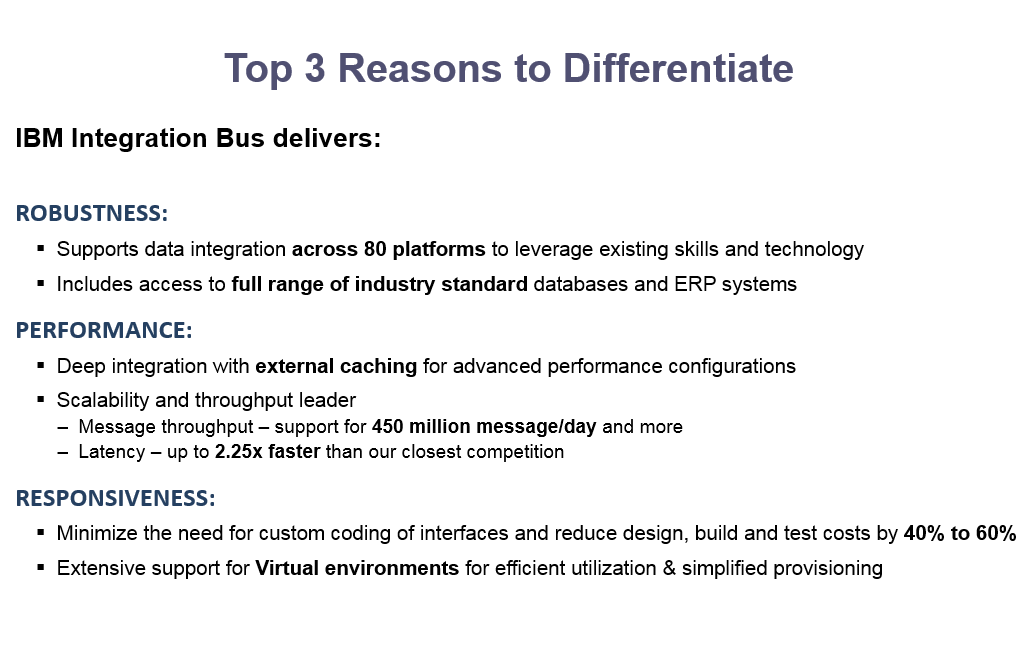
    Why Choose IBM Integration?


    Provider of Integration technology*

    §Over 1,500 clients achieve flexible integration with IBM Integration Bus
    §Proven robust and scalable across many industries worldwide for the last 12 years
    §Deployed across high volume mission critical scenarios
    §Market leading global support policy
    §No vendor lock in with standards leadership for integration across both IBM and non-IBM environments
    §Regular enhancements from R&D labs across US, Europe and Asia
    §Global skills base of over 1,300 partners**, and more than 2000 developers certified each year

    Report:  IBM Named Marketshare Leader in Middleware Software
    Announcement confirms 12th Consecutive Year of Software Leadership
      April, 2013

    * Source: IBM Named Marketshare Leader in Middleware Software”


    About IBM Integration Bus


    A high performing, robust enterprise service bus (ESB) to integrate data across heterogeneous IT systems and applications.


    Callable message flows in IBM Integration Bus on Cloud

    The introduction of callable flows makes IBM Integration Bus (IIB) a truly hybrid integration solution, allowing you to split integration tasks easily between on-premises and cloud IIB installations. You can call on-premises flows securely from the cloud; you can call cloud-based flows securely from IIB on premises. Callable flows facilitate reuse and the dynamic routing of workload.
    CallableFlows
    these two calling and callable flows can be deployed on two different instances, which are not required to run in the same EG/Integration server
    To find out more about callable flows, see Callable message flows in the IBM Knowledge Center.

    Distributed Computing: A Guide to Comparing Data Between Hive Tables Using Spark

    In big data, efficient data comparison is essential for ensuring data integrity and validating data migrations. Apache Spark, with its in-me...