from selenium import webdriver
from selenium.webdriver.common.by import By
from selenium.webdriver.support.ui import WebDriverWait
from selenium.webdriver.support import expected_conditions as EC
usernameStr = 'userid@gmail'
passwordStr = 'pwd'
browser = webdriver.Chrome()
browser.get(('https://accounts.google.com/signin/v2/identifier?service=mail&passive=true&rm=false&continue=https%3A%2F%2Fmail.google.com%2Fmail%2F&ss=1&scc=1<mpl=default<mplcache=2&emr=1&osid=1&flowName=GlifWebSignIn&flowEntry=ServiceLogin'))
# fill in username and hit the next button
username = browser.find_element_by_id('Sign in')
username.send_keys(usernameStr)
nextButton = browser.find_element_by_id('next')
nextButton.click()
# wait for transition then continue to fill items
password = WebDriverWait(browser, 1).until(
EC.presence_of_element_located((By.ID, 'Passwd')))
password.send_keys(passwordStr)
signInButton = browser.find_element_by_id('signin')
signInButton.click()
Mouse
import pyautogui
import win32api
import sys
pyautogui.FAILSAFE = False
for i in range(80000000000000000000):
if win32api.GetAsyncKeyState(ord('K')):
sys.exit()
pyautogui.moveTo(1, 1, duration=1.25)
pyautogui.click(10, 5)
pyautogui.moveTo(100, 100, duration=1.25)
Thursday, April 26, 2018

Friday, March 16, 2018
REST Vs SOAP
REST (REpresentational State Transfer) is an architectural style for developing web services. REST is popular due to its simplicity and the fact that it builds upon existing systems and features of the internet's HTTP in order to achieve its objectives, as opposed to creating new standards, frameworks and technologies.
Advantages of REST
A primary benefit of using REST, both from a client and server's perspective, is REST-based interactions happen using constructs that are familiar to anyone who is accustomed to using the internet's Hypertext Transfer Protocol (HTTP).
An example of this arrangement is REST-based interactions all communicate their status using standard HTTP status codes. So, a 404 means a requested resource wasn't found; a 401 code means the request wasn't authorized; a 200 code means everything is OK; and a 500 means there was an unrecoverable application error on the server.
Similarly, details such as encryption and data transport integrity are solved not by adding new frameworks or technologies, but instead by relying on well-known Secure Sockets Layer (SSL) encryption and Transport Layer Security (TLS). So, the entire REST architecture is built upon concepts with which most developers are already familiar.
REST is also a language-independent architectural style. REST-based applications can be written using any language, be it Java, Kotlin, .NET, AngularJS or JavaScript. As long as a programming language can make web-based requests using HTTP, it is possible for that language to be used to invoke a RESTful API or web service. Similarly, RESTful web services can be written using any language, so developers tasked with implementing such services can choose technologies that work best for their situation.
The other benefit of using REST is its pervasiveness. On the server side, there are a variety of REST-based frameworks for helping developers create RESTful web services, including RESTlet and Apache CXF. From the client side, all of the new JavaScript frameworks, such as JQuery, Node.js, Angular and EmberJS, all have standard libraries built into their APIs that make invoking RESTful web services and consuming the XML- or JSON-based data they return a relatively straightforward endeavor.
Disadvantages of REST
The benefit of REST using HTTP constructs also creates restrictions, however. Many of the limitations of HTTP likewise turn into shortcomings of the REST architectural style. For example, HTTP does not store state-based information between request-response cycles, which means REST-based applications must be stateless and any state management tasks must be performed by the client.
Similarly, since HTTP doesn't have any mechanism to send push notifications from the server to the client, it is difficult to implement any type of services where the server updates the client without the use of client-side polling of the server or some other type of web hook.
From an implementation standpoint, a common problem with REST is the fact that developers disagree with exactly what it means to be REST-based. Some software developers incorrectly consider anything that isn't SOAP-based to be RESTful. Driving this common misconception about REST is the fact that it is an architectural style, so there is no reference implementation or definitive standard that will confirm whether a given design is RESTful. As a result, there is discourse as to whether a given API conforms to REST-based principles.
Alternatives to REST
Alternate technologies for creating SOA-based systems or creating APIs for invoking remote microservices include XML over HTTP (XML-RPC), CORBA, RMI over IIOP and the Simple Object Access Protocol (SOAP).
Each technology has its own set of benefits and drawbacks, but the compelling feature of REST that sets it apart is the fact that, rather than asking a developer to work with a set of custom protocols or to create a special data format for exchanging messages between a client and a server, REST insists the best way to implement a network-based web service is to simply use the basic construct of the network protocol itself, which in the case of the internet is HTTP.
REST vs. SOAP
The two competing styles for implementing web services are REST and SOAP. The fundamental difference between the two is the philosophical approach the two have to remotely invocations.
REST takes a resource-based approach to web-based interactions. With REST, you locate a resource on the server, and you choose to either update that resource, delete it or get some information about it.
With SOAP, the client doesn't choose to interact directly with a resource, but instead calls a service, and that service mitigates access to the various objects and resources behind the scenes.
SOAP has also built a large number of frameworks and APIs on top of HTTP, including the Web Services Description Language (WSDL), which defines the structure of data that gets passed back and forth between the client and the server.
Some problem domains are served well by the ability to stringently define the message format, or can benefit from using various SOAP-related APIs, such as WS-Eventing, WS-Notification and WS-Security. There are times when HTTP cannot provide the level of functionality an application might require, and in these cases, using SOAP is preferable.
REST URIs and URLs
Most people are familiar with the way URLs and URIs work on the web. A RESTful approach to developing applications asserts that requesting information about a resource should be as simple as invoking its URL.
For example, if a client wanted to invoke a web service that listed all of the quizzes available here at TechTarget, the URL to the web service would look something like this:
www.techtarget.com/restfulapi/quizzes
When invoked, the web service might respond with the following JSON string listing all of the available quizzes, one of which is about DevOps:
{ "quizzes" : [ "Java", "DevOps", "IoT"] }
To get the DevOps quiz, the web service might be called using the following URL:
www.techtarget.com/restfulapi/quizzes/DevOps
Invoking this URL would return a JSON string listing all of the questions in the DevOps quiz. To get an individual question from the quiz, the number of the question would be added to the URL. So, to get the third question in the DevOps quiz, the following RESTful URL would be used:
www.techtarget.com/restfulapi/quizzes/DevOps/3
Invoking that URL might return a JSON string such as the following:
{ "Question" : {"query":"What is your DevOps role?", "optionA":"Dev", "optionB":"Ops"} }
As you can see, the REST URLs in this example are structured in a logical and meaningful way that identifies the exact resource being requested.
JSON and XML REST data formats
The example above shows JSON used as the data exchange format for the RESTful interaction. The two most common data exchange formats are JSON and XML, and many RESTful web services can use both formats interchangeably, as long as the client can request the interaction to happen in either XML or JSON.
Note that while JSON and XML are popular data exchange formats, REST itself does not put any restrictions on what the format should be. In fact, some RESTful web services exchange binary data for the sake of efficiency. This is another benefit to working with REST-based web services, as the software architect is given a great deal of freedom in terms of how best to implement a service.
REST and the HTTP methods
The example above only dealt with accessing data.
The default operation of HTTP is GET, which is intended to be used when getting data from the server. However, HTTP defines a number of other methods, including PUT, POST and DELETE.
The REST philosophy asserts that to delete something on the server, you would simply use the URL for the resource and specify the DELETE method of HTTP. For saving data to the server, a URL and the PUT method would be used. For operations that are more involved than simply saving, reading or deleting information, the POST method of HTTP can be used.
History of REST
REST was first coined by computer scientist Roy Fielding in his year-2000 Ph.D. dissertation at the University of California, titled Architectural Styles and the Design of Network-based Software Architectures.
Chapter 5 of the dissertation, "Representational State Transfer (REST)," described Fielding's beliefs about how best to architect distributed hypermedia systems. Fielding noted a number of boundary conditions that describe how REST-based systems should behave. These conditions are referred to as REST constraints, with four of the key constraints described below:
- Use of a uniform interface (UI). As stated earlier, resources in REST-based systems should be uniquely identifiable through a single URL, and only by using the underlying methods of the network protocol, such as DELETE, PUT and GET with HTTP, should it be possible to manipulate a resource.
- Client-server-based. In a REST-based system, there should be a clear delineation between the client and the server. UI and request-generating concerns are the domain of the client. Meanwhile, data access, workload management and security are the domain of the server. This separation allows loose coupling between the client and the server, and each can be developed and enhanced independent of the other.
- Stateless operations. All client-server operations should be stateless, and any state management that is required should happen on the client, not the server.
- RESTful resource caching. The ability to cache resources between client invocations is a priority in order to reduce latency and improve performance. As a result, all resources should allow caching unless an explicit indication is made that it is not possible.
Wednesday, February 28, 2018
Node.js
JavaScript is quickly becoming the go-to language for web developers. Front-end web developers use JavaScript to add user interface enhancements, add interactivity, and talk to back-end web services using AJAX. Web developers who work on the server-side are also flocking to JavaScript because of the efficiencies and speed offered by JavaScript’s event-driven, non-blocking nature.
In fact, concentrating on JavaScript as your language of choice offers the opportunity to master a single language while still being able to develop “full-stack” web applications. The key to this server-side JavaScript revolution is Node.js® — a version of Chrome’s V8 JavaScript runtime engine — which makes it possible to run JavaScript on the server-side.
Node.js is also used for developing desktop applications and for deploying tools that make developing web sites simpler. For example, by installing Node.js® on your desktop machine, you can quickly convert CoffeeScript to JavaScript, SASS to CSS, and shrink the size of your HTML, JavaScript and graphic files. Using NPM — a tool that makes installing and managing Node modules — it’s quite easy to add many useful tools to your web development toolkit.
Prerequisites
Node isn’t a program that you simply launch like Word or Photoshop: you won’t find it pinned to the taskbar or in your list of Apps. To use Node you must type command-line instructions, so you need to be comfortable with (or at least know how to start) a command-line tool like the Windows Command Prompt, PowerShell, Cygwin, or the Git shell (which is installed along with Github for Windows).
Installation Overview
Installing Node and NPM is pretty straightforward using the installer package available from the Node.js® web site.
Installation Steps
- Download the Windows installer from the Nodes.js® web site.
- Run the installer (the .msi file you downloaded in the previous step.)
- Follow the prompts in the installer (Accept the license agreement, click the NEXT button a bunch of times and accept the default installation settings).
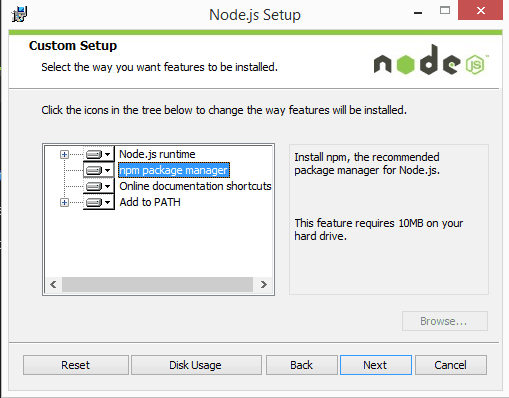
- Restart your computer. You won’t be able to run Node.js® until you restart your computer.
Test it!
Make sure you have Node and NPM installed by running simple commands to see what version of each is installed and to run a simple test program:
- Test Node. To see if Node is installed, open the Windows Command Prompt, Powershell or a similar command line tool, and type
node -v. This should print a version number, so you’ll see something like thisv0.10.35. - Test NPM. To see if NPM is installed, type
npm -vin Terminal. This should print NPM’s version number so you’ll see something like this1.4.28 - Create a test file and run it. A simple way to test that node.js works is to create a JavaScript file: name it
hello.js, and just add the codeconsole.log('Node is installed!');. To run the code simply open your command line program, navigate to the folder where you save the file and typenode hello.js. This will start Node and run the code in thehello.jsfile. You should see the outputNode is installed!.
How to Update Node and NPM
New versions of Node and NPM come out frequently. To install the updates, just download the installer from the Nodejs.org site and run it again. The new version of Node and NPM will replace the older versions.
How to Uninstall Node and NPM
You uninstall Node.js and NPM the same as you would most Windows software:
- Open the Windows Control Panel
- Choose the “Programs and Features” option
- Click the “Uninstall a program” option
- Select Node.js, and click the Uninstall link.
With Node.js and NPM installed you’ll soon be able to take advantage of the huge world of NPM modules that can help with a wide variety of tasks both on the web server and on your desktop (or laptop) machine. The NPM site lists all of the official Node packages making it easy to make the choice. Have fun and check out my current courses at Treehouse. And after, you’ve installed Node, check out the Node.js Basics course on Treehouse by my colleague, Andrew Chalkley.
Thursday, February 15, 2018
Python
Getting Started with Python Programming for Windows Users
Installation of Python
- Download the current production version of Python (2.7.1) from the Python Download site.
- Double click on the icon of the file that you just downloaded.
- Accept the default options given to you until you get to the Finish button. Your installation is complete.
Setting up the Environment
- Starting at My Computer go to the following directory C:\Python27. In that folder you should see all the Python files.
- Copy that address starting with C: and ending with 27 and close that window.
- Click on Start. Right Click on My Computer.
- Click on Properties. Click on Advanced System Settings or Advanced.
- Click on Environment Variables.
- Under System Variables search for the variable Path.
- Select Path by clicking on it. Click on Edit.
- Scroll all the way to the right of the field called Variable value using the right arrow.
- Add a semi-colon (;) to the end and paste the path (to the Python folder) that you previously copied. Click OK.
Writing Your First Python Program
- Create a folder called PythonPrograms on your C:\ drive. You will be storing all your Python programs in this folder.
- Go to Start and either type Run in the Start Search box at the bootom or click on Run.
- Type in notepad in the field called Open.
- In Notepad type in the following program exactly as written:
# File: Hello.py

print "Hello World!"
- Go to File and click on Save as.
- In the field Save in browse for the C: drive and then select the folder PythonPrograms.
- For the field File name remove everything that is there and type in Hello.py.
- In the field Save as type select All Files
- Click on Save. You have just created your first Python program.
Running Your First Program
- Go to Start and click on Run.
- Type cmd in the Open field and click OK.
- A dark window will appear. Type cd C:\ and hit the key Enter.
- If you type dir you will get a listing of all folders in your C: drive. You should see the folder PythonPrograms that you created.
- Type cd PythonPrograms and hit Enter. It should take you to the PythonPrograms folder.
- Type dir and you should see the file Hello.py.
- To run the program, type python Hello.py and hit Enter.
- You should see the line Hello World!
- Congratulations, you have run your first Python program.
Getting Started with Python Programming for Mac Users
Writing Your First Python Program
- Click on File and then New Finder Window.
- Click on Documents.
- Click on File and then New Folder.
- Call the folder PythonPrograms. You will be storing all class related programs there.
- Click on Applications and then TextEdit.
- Click on TextEdit on the menu bar and select Preferences.
- Select Plain Text.
- In the empty TextEdit window type in the following program, exactly as given:
# File: Hello.py

print "Hello World!"
- From the File menu in TextEdit click on Save As.
- In the field Save As: type Hello.py.
- Select Documents and the file folder PythonPrograms.
- Click Save.
Running Your First Program
- Select Applications, then Utilities and Terminal.
- In your Terminal window type ls and Return. It should give a listing of all the top level folders. You should see the Documents folder.
- Type cd Documents and hit Return.
- Type ls and hit Return and you should see the folder PythonPrograms.
- Type cd PythonPrograms and hit Return.
- Type ls and hit return and you should see the file Hello.py.
- To run the program, type python Hello.py and hit Return.
- You should see the line Hello World!
- Congratulations, you have run your first Python program.
Starting IDLE on Mac
- In a Terminal window, type python. This will start the Python shell. The prompt for that is >>>
- At the Python shell prompt type import idlelib.idle
- This will start the IDLE IDE
Using IDLE on either Windows or Mac
- Start IDLE
- Go to File menu and click on New Window
- Type your program in
- Go to File menu and click on Save. Type in filename.py This will save it as a plain text file, which can be opened in in any editor you choose (like Notepad or TextEdit).
- To run your program go to Run and click Run Module
- You can run the pip install pypiwin32 in case you get missing module error while importing anything lib
- https://automatetheboringstuff.com/
Wednesday, January 31, 2018
Chatbots
<a href="https://developer.ibm.com/courses/all/chatbots-for-good-empathetic-chatbots?cm_mmc=dw-_-edtech-_-GWC-_-sticker"><img src="https://developer.ibm.com/courses/wp-content/uploads/sites/83/chatbot-sticker.png" alt="I took the Chatbots for good course and earned a badge! You can earn one too!" /></a>
Friday, January 26, 2018
BlockChain Technology
In simple terms it's an enhanced distributed ledger, i.e decentralized ledger.
The following are few sample industries where we can implement blockchain technology.
Financial applications,
Retails
Supply Chain
DealerShips
Dimond industry etc.
A walk thru of a business case..
Let's talk about car dealer ship where there are multiple parties involved in the process of reaching the car from the manufacturer to the end consumer, such as..
1) Manufacturer
2) Distributor
3) Dealer
4) Consumer
5) Consumer 2 etc.
The following are few sample industries where we can implement blockchain technology.
Financial applications,
Retails
Supply Chain
DealerShips
Dimond industry etc.
A walk thru of a business case..
Let's talk about car dealer ship where there are multiple parties involved in the process of reaching the car from the manufacturer to the end consumer, such as..
1) Manufacturer
2) Distributor
3) Dealer
4) Consumer
5) Consumer 2 etc.
Thursday, January 18, 2018
Using Shared Libraries in IIB v10
IBM Integration Bus v10 has introduced many new features. One of the important feature, from my point of view, is the introduction of Shared Library concept.
We all know that WebSphere Message Broker v8 provided new ways of organizing resources in toolkit by introducing
- Application container, as per the info-center, is a container for all the resources that are required to create a solution.
- Provides run-time isolation –> resources inside the application are not visible to other resources
- Used when updates to one group of deployed resources should not affect another group of deployed resources
- Library container, for organizing resources for re-usability. Can be referenced by applications or services or integration projects.
- WMB v8 introduced Static library
The behavior of the library container introduced in WMB 8 and used in IIB v9, as per info-center are provided below

Drawback of Library used in WMB 8 / IIB 9: Owing to Application / Service’s run time isolation behavior, we solution developers faced major challenges on deciding whether to organize our solution using Applications / Services or using Integration Projects.Whensolutions were organized using Applications / Services and the reusable artifact(s), like Common Error Handling framework / logging framework, organized using libraries, each application / services carried copy of library within themselves. As a result, any changes made to these reusable artifact always resulted in need to re-deploy all applications / services.
In that regards, organizing the resources as Integration Projects was better and very much appealing.
But IIB v10 has addressed this concern / problem by introducing Shared Libraries. Now the Applications / Services do not take copy of the Shared Library within themselves. As the Shared Libraries are deployed directly at the Integration Server level.
Advantages of Shared Libraries
- Shared Libraries can be added to the BAR file independently of referencing Applications / Services
- Deployment of updated Shared Library results in the changes immediately picked up by all referencing applications / services at run-time. Hence no need to redeploy all referencing applications / services
- Enables using / referencing to multiple XML or DFDL schema files that declare the same elements and types, by having them stored in separate Shared Libraries
Reference: http://www.ibm.com/support/knowledgecenter/SSMKHH_10.0.0/com.ibm.etools.mft.doc/bc23067_.htm?lang=en

Shared Library vs Static Library from Toolkit to Run-time
- In the New Library window, specify the name for the library and selecting the library type as “Shared Library”, click Finish

- Below Images shows the Shared and Static libraries in the toolkit

- Referencing to Shared Library / Static library from Application is shown below

- When adding to the BAR file, Shared Libraries are displayed in the BAR Editor separately and have to be selected explicitly for adding to the bar file. This is not the case with Static Library as they are added automatically when application referencing them is added to BAR file.

- After deployment, you could notice the difference between Shared & Static library. Static library copy will be present within the application container, where as the Shared Library is outside the application container and directly under the Integration Server.

Hope this blog provides insight into Shared Library feature of IIB 10.
Subscribe to:
Posts (Atom)