Thursday, February 16, 2017

WebSphere ESB Interview Question and Answers

               An enterprise service bus (ESB) is software architecture for middleware that provides fundamental services for more complex architectures. For example, an ESB incorporates the features required to implement a service-oriented architecture (SOA). In a general sense, an ESB can be thought of as a mechanism that manages access to applications and services (especially legacy versions) to present a single, simple, and consistent interface to end-users via Web- or forms-based client-side front ends.
  1. What are all the Primitives used in Mediation?
     We have different types of primitives in mediation.
1.      Message Filter
2.      Type Filter
3.      Endpoint Lookup
4.      Service Invoke
5.      Fan-out
6.      Fan-in
7.      XSLT
8.      BO Map
9.      Message Element Setter
10.  DB lookup
11.  Data Handler
12.  Custom Mediation
13.  Header Setters
14.  Message Logger
15.  Even Emitter
16.  Stop
17.  Fail
18.  Sub Flow
  1. Difference between BO Map and XSLT?
     Both are used for manipulate and transfer the message.
Use XSLT when
Use BO Maps when
You have an existing stylesheet or want to use custom XSLT in the map.
You have an existing BO Map or submap.
You want to use XPath expressions inside the map.
You want to use the relationship service (particularly dynamic relationships).
You want to use Java snippets that use the DOM API to access or update data.
You want to use Java snippets that use the BO API (SDO API) to access or update data.
You want to use built-in XPath or EXSLT functions to access or modify data.
You want to order the completion sequence for the transforms.
You want to combine contents from more than one array (repeating element).
BO Maps can be faster when used with WebSphere® Adapters, because the BO Maps work directly with the SDO API.
Performance with XSLT or BO Maps depends on a number of factors including:
  • An XSLT map is fastest when processing web services messages and the incoming data is unmodified between the entrance to the mediation flow and the XSLT primitive.
  • A BO map can be faster when the message content has already been accessed in the mediation flow.
  1. What is SMO? And wt it contains?
     The SMO model is a pattern for using SDO Data Objects to represent messages. The SMO contains a representation of the following groups of data:
  • The business payload of the message. The payload is the application data exchanged between service endpoints.
  • Header information associated with the message. For example, Java Message Service (JMS) headers if a message have been conveyed using the JMS API.
  • Context information (data other than the message payload).
  1. What are Shared, Transient and Correlation Context?
      Shared Context: Context is a temporary area which is created along with                Service Message Object (SMO) in the Mediation Flows. Shared Context is a     type of context which is present in the SMO. Shared Context is mainly used   when we are using Aggregation process where we need to Iterate the BO for          Certain times. Shared Context maintains Aggregation data between      Aggregation (FanOut and FanIn) primitives. The Content (data) which is present in the shared context BO does not persist across Request and        Response flows i.e The Data in the Shared Context which is used in Request    flow can not be used again in Response flow.
      Transient Context: Used for passing values between Mediation primitives      within the current flow — either the request flow or the responses flow. The     transient context cannot link requests and responses and hence cannot be      used across.
      Used when you want to save an input message before a service invokes call    (within a request or response flow). After the services invoke call, the next        primitive can create another message by combining the service invoke     response and the original message stored in the transient context.
     Correlation Context: Used when Mediation primitives want to pass values      from the request flow to the response flow.
     Used to pass values from the request message onto the response.
  1. Difference between Callout and Service Invoke?
     Service Invoke: The Service Invoke primitive is used to make a service         request in either a request or response mediation flow. The service may be      Request/Response or One-Way. Multiple instances of the Service Invoke           primitive are permitted in a flow, allowing a series of service invocations to be performed. 
     Callout: The Callout receives the message and calls the requested        service          and operation. There is a Callout node for each connected     target operation in the mediation flow.
o        If the call is successful, the Callout Response node in the response flow receives the response message.
o        If the call is unsuccessful, the Callout can be set to retry service invocations depending on the type of fault received.
  1. How can you implement loop in mediation?
     By using Fan-in and Fan-out primitive.
  1. What is the functionality of Fan-in and Fan-out?
     Fan-out:We can use the Fan Out primitive to fire the output terminal once     (with the  input message) or to fire the output terminal multiple times. You       can use Fan Out in isolation or as part of a Fan Out and Fan In combination.
      Fan-In: Fan In is always partnered with a Fan Out in the same flow and acts   as a decision point for when to continue flow execution. It receives a number         of messages until a decision point is reached, at which point the last message           to be received is propagated to the output terminal. The Fan In primitive may      only be used in combination with Fan Out. 
  1. How can you change the runtime changes using mediation primitive?
     We have future called Promotable properties in ESB. We can configure this      future while development. Then we can make it changed at runtime without       restarting      the server it can be published.
  1. What are all the configurations required for JDBC Adapter implementation?
     Data Source need to be created and need to configure with DB. If we have     security, then need to created security authentication.
  1. Different between SDO and SMO?
     SDO: Service Data Object is the representation of the variable or Object.
     SMO: The SMO model is a pattern for using SDO Data Objects to represent     messages
  1. Difference between Stop and fail?
     Stop: Stops a particular path in the flow, without generating an exception.
            Fail: Generates a failure in the flow.

Tuesday, February 14, 2017

CICS connectivity configurable service


CAST(CAST(var AS DATE FORMAT 'yyyyMMdd')AS CHARACTER FORMAT 'yyyy-MM-dd');


SUBSTRING(Name FROM 1 FOR10))

mqsireportproperties TESTNODE_node -o HTTPSConnector -a

mqsichangeproperties TESTNODE_node -o HTTPSConnector -n explicitlySetPortNumber -v 7843


mqsichangetrace TESTNODE_node -u -e Java_POC -c 1400000 -r -l debug

mqsireadlog TESTNODE_nodename -u -f -e Java_POC -o C:\3.xml

mqsiformatlog -i C:LOGFILE3.xml -o C:\LOGFILE3.xml

mqsichangetrace TESTNODE_node -u -e Java_POC -c 1400000 -r -l none


mqsisetdbparms TESTNODE_node -n cics::Cicssecid -u R –p ********

mqsisetdbparms TESTNODE_node -n cics::Cicssecid -u R -p myPassword

mqsicreateconfigurableservice TESTNODE_govi.reddy -c CICSConnection -o CICSCONNECT08 -n connectionTimeoutSecs,clientQualifier,cicsServer, securityIdentity,requestTimeoutSecs,clientApplid -v 30,IIBDEV01,ssl://xyz:9802,Cicssecid,120


mqsicvp TESTNODE_govi.reddy -n CICSCONNECT08

Wednesday, February 8, 2017

Weather or temperature conversion webservice WSDL

<definitions xmlns="http://schemas.xmlsoap.org/wsdl/" xmlns:xs="http://www.w3.org/2001/XMLSchema" xmlns:soap="http://schemas.xmlsoap.org/wsdl/soap/" xmlns:soap12="http://schemas.xmlsoap.org/wsdl/soap12/" xmlns:tns="http://webservices.daehosting.com/temperature" name="TemperatureConversions" targetNamespace="http://webservices.daehosting.com/temperature">
<types>
<xs:schema elementFormDefault="qualified" targetNamespace="http://webservices.daehosting.com/temperature">
<xs:element name="CelsiusToFahrenheit">
<xs:complexType>
<xs:sequence>
<xs:element name="nCelsius" type="xs:decimal"/>
</xs:sequence>
</xs:complexType>
</xs:element>
<xs:element name="CelsiusToFahrenheitResponse">
<xs:complexType>
<xs:sequence>
<xs:element name="CelsiusToFahrenheitResult" type="xs:decimal"/>
</xs:sequence>
</xs:complexType>
</xs:element>
<xs:element name="FahrenheitToCelsius">
<xs:complexType>
<xs:sequence>
<xs:element name="nFahrenheit" type="xs:decimal"/>
</xs:sequence>
</xs:complexType>
</xs:element>
<xs:element name="FahrenheitToCelsiusResponse">
<xs:complexType>
<xs:sequence>
<xs:element name="FahrenheitToCelsiusResult" type="xs:decimal"/>
</xs:sequence>
</xs:complexType>
</xs:element>
<xs:element name="WindChillInCelsius">
<xs:complexType>
<xs:sequence>
<xs:element name="nCelsius" type="xs:decimal"/>
<xs:element name="nWindSpeed" type="xs:decimal"/>
</xs:sequence>
</xs:complexType>
</xs:element>
<xs:element name="WindChillInCelsiusResponse">
<xs:complexType>
<xs:sequence>
<xs:element name="WindChillInCelsiusResult" type="xs:decimal"/>
</xs:sequence>
</xs:complexType>
</xs:element>
<xs:element name="WindChillInFahrenheit">
<xs:complexType>
<xs:sequence>
<xs:element name="nFahrenheit" type="xs:decimal"/>
<xs:element name="nWindSpeed" type="xs:decimal"/>
</xs:sequence>
</xs:complexType>
</xs:element>
<xs:element name="WindChillInFahrenheitResponse">
<xs:complexType>
<xs:sequence>
<xs:element name="WindChillInFahrenheitResult" type="xs:decimal"/>
</xs:sequence>
</xs:complexType>
</xs:element>
</xs:schema>
</types>
<message name="CelsiusToFahrenheitSoapRequest">
<part name="parameters" element="tns:CelsiusToFahrenheit"/>
</message>
<message name="CelsiusToFahrenheitSoapResponse">
<part name="parameters" element="tns:CelsiusToFahrenheitResponse"/>
</message>
<message name="FahrenheitToCelsiusSoapRequest">
<part name="parameters" element="tns:FahrenheitToCelsius"/>
</message>
<message name="FahrenheitToCelsiusSoapResponse">
<part name="parameters" element="tns:FahrenheitToCelsiusResponse"/>
</message>
<message name="WindChillInCelsiusSoapRequest">
<part name="parameters" element="tns:WindChillInCelsius"/>
</message>
<message name="WindChillInCelsiusSoapResponse">
<part name="parameters" element="tns:WindChillInCelsiusResponse"/>
</message>
<message name="WindChillInFahrenheitSoapRequest">
<part name="parameters" element="tns:WindChillInFahrenheit"/>
</message>
<message name="WindChillInFahrenheitSoapResponse">
<part name="parameters" element="tns:WindChillInFahrenheitResponse"/>
</message>
<portType name="TemperatureConversionsSoapType">
<operation name="CelsiusToFahrenheit">
<documentation>
Converts a Celsius Temperature to a Fahrenheit value
</documentation>
<input message="tns:CelsiusToFahrenheitSoapRequest"/>
<output message="tns:CelsiusToFahrenheitSoapResponse"/>
</operation>
<operation name="FahrenheitToCelsius">
<documentation>
Converts a Fahrenheit Temperature to a Celsius value
</documentation>
<input message="tns:FahrenheitToCelsiusSoapRequest"/>
<output message="tns:FahrenheitToCelsiusSoapResponse"/>
</operation>
<operation name="WindChillInCelsius">
<documentation>
Windchill temperature calculated with the formula of Steadman
</documentation>
<input message="tns:WindChillInCelsiusSoapRequest"/>
<output message="tns:WindChillInCelsiusSoapResponse"/>
</operation>
<operation name="WindChillInFahrenheit">
<documentation>
Windchill temperature calculated with the formula of Steadman
</documentation>
<input message="tns:WindChillInFahrenheitSoapRequest"/>
<output message="tns:WindChillInFahrenheitSoapResponse"/>
</operation>
</portType>
<binding name="TemperatureConversionsSoapBinding" type="tns:TemperatureConversionsSoapType">
<soap:binding style="document" transport="http://schemas.xmlsoap.org/soap/http"/>
<operation name="CelsiusToFahrenheit">
<soap:operation soapAction="" style="document"/>
<input>
<soap:body use="literal"/>
</input>
<output>
<soap:body use="literal"/>
</output>
</operation>
<operation name="FahrenheitToCelsius">
<soap:operation soapAction="" style="document"/>
<input>
<soap:body use="literal"/>
</input>
<output>
<soap:body use="literal"/>
</output>
</operation>
<operation name="WindChillInCelsius">
<soap:operation soapAction="" style="document"/>
<input>
<soap:body use="literal"/>
</input>
<output>
<soap:body use="literal"/>
</output>
</operation>
<operation name="WindChillInFahrenheit">
<soap:operation soapAction="" style="document"/>
<input>
<soap:body use="literal"/>
</input>
<output>
<soap:body use="literal"/>
</output>
</operation>
</binding>
<binding name="TemperatureConversionsSoapBinding12" type="tns:TemperatureConversionsSoapType">
<soap12:binding style="document" transport="http://schemas.xmlsoap.org/soap/http"/>
<operation name="CelsiusToFahrenheit">
<soap12:operation soapAction="" style="document"/>
<input>
<soap12:body use="literal"/>
</input>
<output>
<soap12:body use="literal"/>
</output>
</operation>
<operation name="FahrenheitToCelsius">
<soap12:operation soapAction="" style="document"/>
<input>
<soap12:body use="literal"/>
</input>
<output>
<soap12:body use="literal"/>
</output>
</operation>
<operation name="WindChillInCelsius">
<soap12:operation soapAction="" style="document"/>
<input>
<soap12:body use="literal"/>
</input>
<output>
<soap12:body use="literal"/>
</output>
</operation>
<operation name="WindChillInFahrenheit">
<soap12:operation soapAction="" style="document"/>
<input>
<soap12:body use="literal"/>
</input>
<output>
<soap12:body use="literal"/>
</output>
</operation>
</binding>
<service name="TemperatureConversions">
<documentation>
DataFlex Web Service to convert temperature values between Celsius and Fahrenheit
</documentation>
<port name="TemperatureConversionsSoap" binding="tns:TemperatureConversionsSoapBinding">
<soap:address location="http://webservices.daehosting.com/services/TemperatureConversions.wso"/>
</port>
<port name="TemperatureConversionsSoap12" binding="tns:TemperatureConversionsSoapBinding12">
<soap12:address location="http://webservices.daehosting.com/services/TemperatureConversions.wso"/>
</port>
</service>
</definitions>


Monday, January 9, 2017

MQ as a Service in IIB


IBM introdued MQ or Database as SOA service in IIB.This is available in earlier versions of WMB as supportpac.
This includes two things :
·         An IRI Specification defining addresses for referencing WebSphere MQ queues and topics in a way similar to URL Web addresses.
·         A WSDL Binding Specification defining extensions for WSDL that describe WebSphere MQ applications, including its connections, the queues or topics it uses, its message exchange pattern (request-response or one-way) and the quality of service and message formats it uses.
Why MQ or Database services can be used as SOA services?Whats the benefit?
·         Architects can catalogue MQ/DB  applications in a standard way as they are specified in WSDL
·         MQ/DB applications can be extended to Webservice stack. These specifications will enable them to write a WMQ/DB service implementation that will interoperate with other WMQ/DB service implementations.
·         Use the Service Definitions to aid the development, management and monitoring of WebSphere MQ/DB applications, particularly where tools exist that take advantage of these specifications
·         Helps in dynamic invocation

Now,lets create a MQ service and use it in a message flow,

1)Select MQ Service in File->New


2)After creating MQ service,a screen open for MQ service to fill in all the details
3)Provide MQ details to test the connectivity with MQ QueueManager

4)Next step is to choose,whether we are going for One-way or Req-Res modal ,and what are the queues we are selecting
5)Next is to choose ,MQ header information as below,
If we are selecting only one-way,then only Request MQ headers are sufficient to be fillied up
6) Now,we can choose the messagetypes for input messages by first having the messageset in the MQ service folder itself so that it gets referred in the Input (Use XML schema elements Ã Open file)

7)Now drag and drop the newly created MQService to the MQInput node.We can now see that all the properties defined in MQ Service gets reflected in the MQInput node’s properties.

Monday, December 19, 2016

Websphere IIB on Cloud


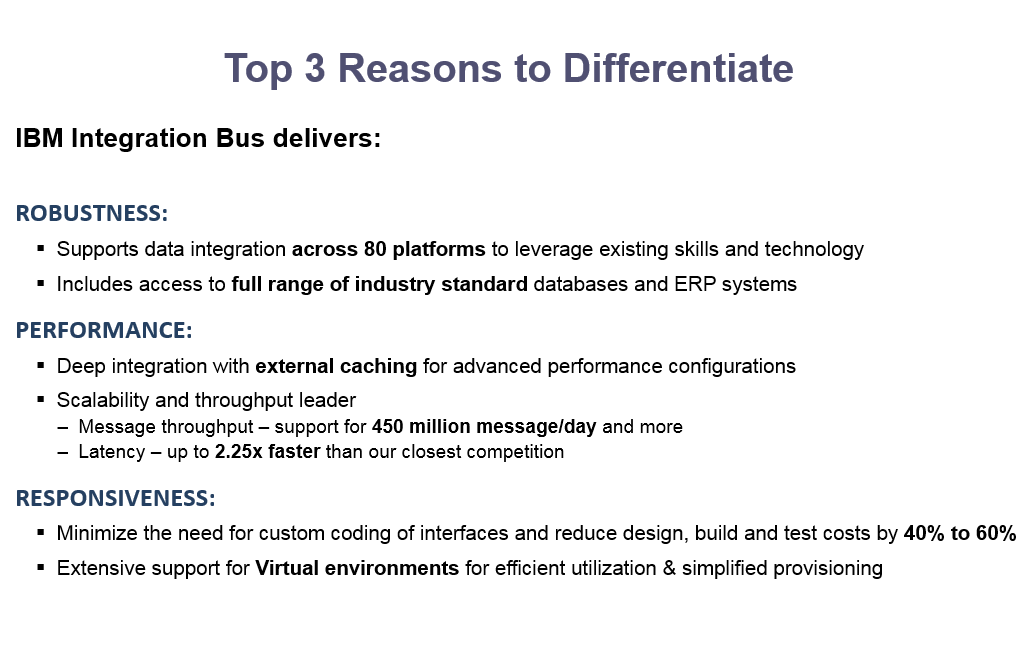
Why Choose IBM Integration?


Provider of Integration technology*

§Over 1,500 clients achieve flexible integration with IBM Integration Bus
§Proven robust and scalable across many industries worldwide for the last 12 years
§Deployed across high volume mission critical scenarios
§Market leading global support policy
§No vendor lock in with standards leadership for integration across both IBM and non-IBM environments
§Regular enhancements from R&D labs across US, Europe and Asia
§Global skills base of over 1,300 partners**, and more than 2000 developers certified each year

Report:  IBM Named Marketshare Leader in Middleware Software
Announcement confirms 12th Consecutive Year of Software Leadership
  April, 2013

* Source: IBM Named Marketshare Leader in Middleware Software”


About IBM Integration Bus


A high performing, robust enterprise service bus (ESB) to integrate data across heterogeneous IT systems and applications.


Callable message flows in IBM Integration Bus on Cloud

The introduction of callable flows makes IBM Integration Bus (IIB) a truly hybrid integration solution, allowing you to split integration tasks easily between on-premises and cloud IIB installations. You can call on-premises flows securely from the cloud; you can call cloud-based flows securely from IIB on premises. Callable flows facilitate reuse and the dynamic routing of workload.
CallableFlows
these two calling and callable flows can be deployed on two different instances, which are not required to run in the same EG/Integration server
To find out more about callable flows, see Callable message flows in the IBM Knowledge Center.

Distributed Computing: A Guide to Comparing Data Between Hive Tables Using Spark

In big data, efficient data comparison is essential for ensuring data integrity and validating data migrations. Apache Spark, with its in-me...